For photographers shooting under LED lights

Remove LED banding from your photos.

One-click software for the horizontal stripes that LED lighting bakes into your JPEGs. Built for weddings, concerts, theater, sports, and any venue where mirrorless meets LED.

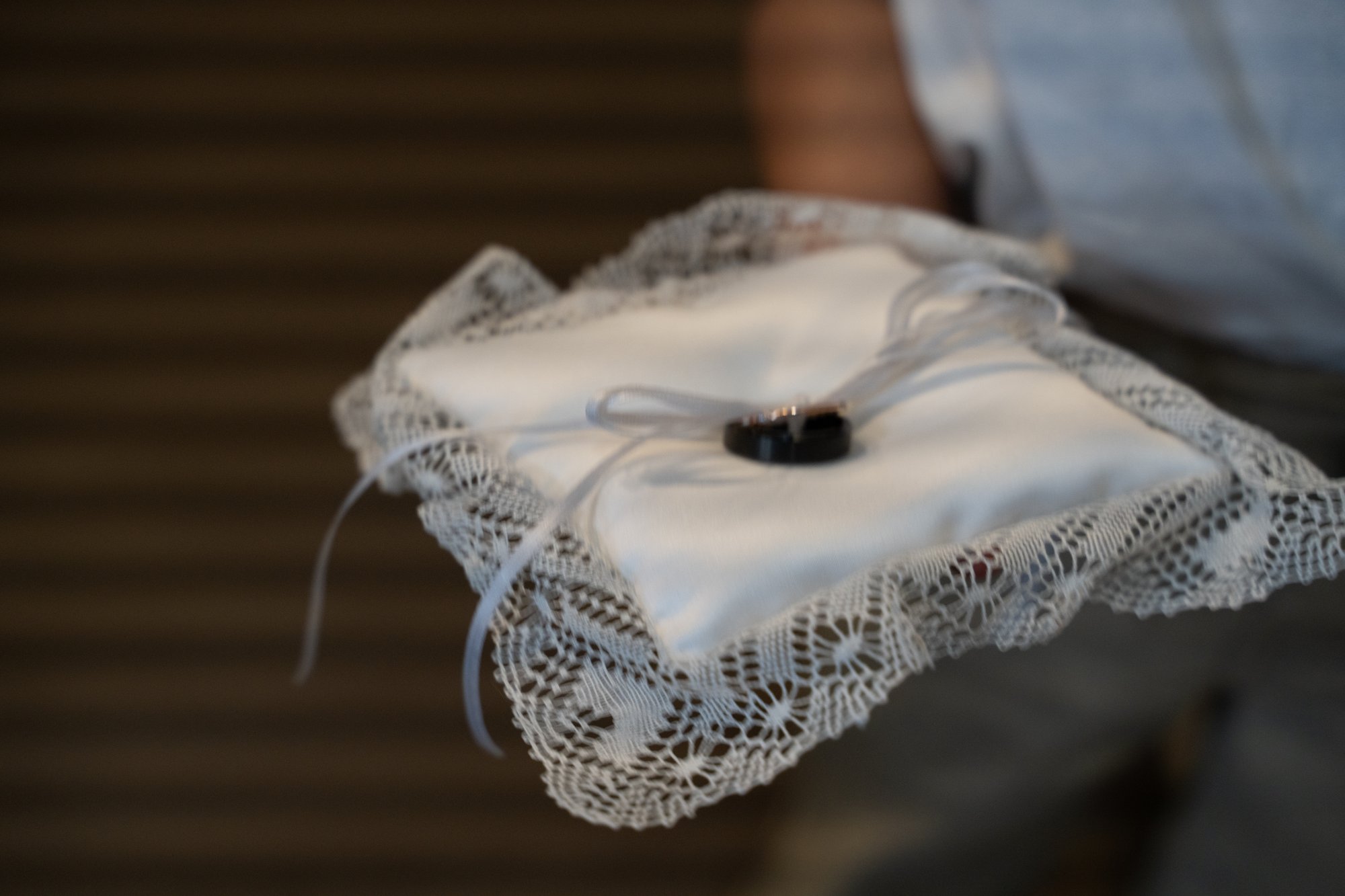
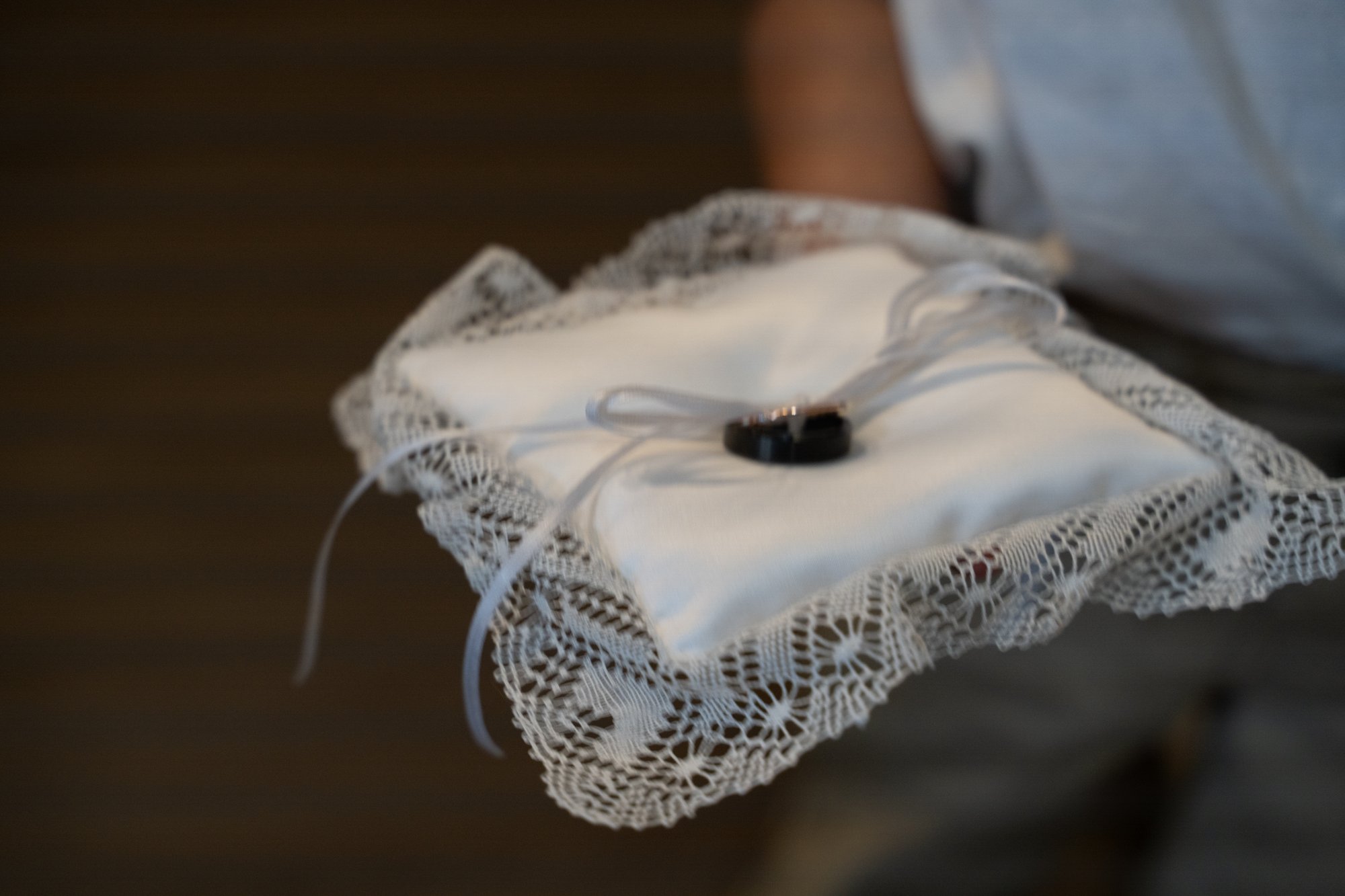
Wedding ring bearer pillow photo showing horizontal LED rolling-shutter banding bars running across the entire frame The same wedding ring bearer pillow photo with the LED banding completely removed by BANDing AID Before After

Coming Summer 2026 · No spam, one email at launch

01 / The problem

Modern LED lights pulse faster than your camera shutter can keep up.

The DJ uplights at the wedding reception. The LED stage wash at the concert. The arena lights at the school recital. The color-changing panels at the corporate event. All of them cycle their output at a frequency your sensor reads as horizontal stripes.

You see it the morning after the shoot. Hundreds of photos, half of them banded. The dress, the dance floor, the band on stage, the front-row faces. No Lightroom slider removes it. The bands are baked into the JPEG.

If you shoot in silent or electronic shutter mode under LED venue lighting and find horizontal stripes running across your photos, that is LED rolling-shutter banding. It happens when your camera electronic shutter scans the sensor line by line while LED lights pulse at a frequency the human eye cannot see but the camera does. Sony A7 and A1 bodies, Nikon Z8 and Z9, Canon R-series, and Fuji X-T mirrorless cameras are all susceptible. Anti-flicker and high-frequency flicker reduction settings help but do not always prevent it, especially with mixed-frequency LED stage and venue lighting.
Wedding reception photo showing LED banding across the dance floor Dance floor LED
Bride dress showing fine horizontal banding from LED uplighting LED uplighting
Wedding ceremony photo with banding across the bridal party Indoor venue
02 / The fix

Drop the photo in. Pick the band direction. Click Auto Fix.

BANDing AID detects the band frequency with FFT analysis, then subtracts it from the image. The result is the photo you took, without the stripes you did not ask for. Most images take a single click.

Most photography blogs say LED rolling-shutter banding cannot be removed in post-processing. They are describing the manual workarounds: Dodge and Burn at low strength, Gaussian Blur masks, frequency separation, dropping shutter speed for retests. BANDing AID is different. It was built specifically to detect the regular horizontal pattern of LED banding and reconstruct the underlying image. One click per photo. Windows desktop application.

Step 01

Drop your JPEG in

Drag and drop, single file or whole folder. Original stays untouched.

Step 02

Auto Fix detects the bands

FFT math finds the period and angle, subtracts the sinusoidal pattern. Adjust strength with the Amount slider.

Step 03

AI Repair for the hard ones

For content-dense shots Auto Fix cannot fully clean, drag a region and let AI handle just that area.

03 / What is included

Four tools that compose into one workflow.

Math first, AI when math runs out. Every correction is auditable, layered, and non-destructive.

Auto Fix

FFT-based band detection.

Pattern-matches the band frequency directly from the image. Works on banding so subtle the eye can barely see it. Adjust strength with the Amount slider. No AI tokens consumed.

Manual Painting

Brush over what Auto missed.

Paint a region, BANDing AID measures the band signal inside the mask and subtracts it. For the spots where Auto Fix global correction was not enough.

AI Repair

GPT-Image for the toughest shots.

When the bands sit on top of dense content, drag a rectangle or lasso, and AI regenerates just that region clean. The full-res original is preserved everywhere outside the selection.

Layers & Projects

Every edit is undoable.

Each AI region and painted mask is its own layer with visibility, strength, and Light adjustments. Save the whole edit as a .bandaid project file, reopen anytime.

Why this exists

Lightroom, Capture One, and DXO do not have a tool for this. BANDing AID is math-first: deterministic correction that preserves every pixel of detail. AI is the optional fallback for the photos where math cannot reach. Built for one job, done well.

FAQ

Questions photographers ask before signing up.

What is LED rolling-shutter banding?

It is the horizontal stripe pattern that appears across photos taken under LED lighting with mirrorless cameras in silent or electronic shutter mode. The camera sensor reads the image line by line, and during that scan the LED lights cycle on and off at a frequency the eye cannot perceive. The result is alternating bands of light and dark, or color shifts, baked into the JPEG.

Is this the same as banding in skies and gradients?

No. Gradient banding (sometimes called posterization) shows up as step-wise blocks of color in smooth gradients like skies. It comes from 8-bit color depth and JPEG compression, and the fix is working in 16-bit or adding noise. LED rolling-shutter banding is a different problem: distinct horizontal stripes across the entire frame, caused by sensor timing rather than bit depth. Tools that fix one will not fix the other.

Is this the same as moire?

No. Moire is a pattern interference effect that appears when fine repeating patterns in a subject (like fabric weaves or fence lines) interact with the sensor pixel grid. LED banding is caused by the timing of the sensor readout against pulsed LED light, not by patterns in the subject.

Why do my Sony, Nikon, Canon, or Fuji mirrorless photos have horizontal stripes?

Most mirrorless cameras have CMOS sensors that read line by line rather than all at once. In silent or electronic shutter mode, that line-by-line scan can fall out of phase with the cycling of LED lighting. Sony A7 and A1 bodies, Nikon Z8 and Z9, Canon R-series, Fuji X-T series, and OM System bodies all show this. The Sony A9 III with global shutter is the one current production body that does not.

Can LED banding be removed in post-processing?

Most photography blogs say no, citing manual workarounds like Dodge and Burn or Gaussian Blur masks that take hours per image. BANDing AID was built specifically to do this in one click using FFT pattern detection. Yes, it can be removed. That is the entire purpose of the software.

Does Lightroom or Photoshop have a tool for this?

Not for this specific kind of banding. Adobe Community has multi-year feature requests asking for an AI-powered fix. Existing Lightroom and Photoshop banding tools (the Grain panel, the various blur and noise filters) target gradient banding in skies, not LED rolling-shutter stripes.

Will BANDing AID work on JPEG files?

Yes. JPEG is the primary use case, since banding is most often noticed after the JPEG has already been generated.

Does it work on RAW files?

Version 1.0 is JPEG-focused. RAW and layered TIFF support are on the roadmap for a future version.

Does it work on Mac?

Version 1.0 ships Windows-first. A Mac build is on the roadmap and will be prioritized based on launch demand.

Why is there no existing tool for this?

LED rolling-shutter banding is a relatively new problem. It scaled with the adoption of mirrorless cameras (especially silent shutter mode at weddings and concerts) and the widespread replacement of incandescent venue lighting with cheaper LED fixtures. The major photo-editor companies have all received feature requests for this. None have shipped one. BANDing AID is the first.

When is BANDing AID launching?

Summer 2026. Drop your email in the form below and we will tell you the day v1.0 ships. One email. No newsletter.

04 / Pricing

$79 one-time.
Yours forever.

No subscription. No watermark on output. Works with your own OpenAI account for AI Repair (most users spend $5 to $15 per year on AI usage). Windows at launch, Mac later. Free updates through v1.x.